
- Home
- Controls
Reference
Mottle Game controls
One action does almost everything in Mottle: hold to move, release to hide. Here is the full set, for desktop and for phones, including the keyboard support most players never notice.
The short version of the Mottle Game controls: drag to move, release to hide. On a keyboard, WASD or the arrow keys move and Esc or P pauses. Holding the pointer down does not count as hiding — you have to lift it.
| Action | Desktop | Phone / tablet | Notes |
|---|---|---|---|
| Move | Hold the mouse button and drag | Drag with one finger | The creature walks toward your pointer, not away from it |
| Stop and hide | Release the mouse button | Lift your finger | Camouflage reaches 100% after about 0.75 s still |
| Keyboard movement | W A S D or arrow keys | Not applicable | Directional input, not a cursor |
| Pause / resume | Esc or P | Pause icon in the arena | Pause works; Resume does not in the current build. Use Reload above. |
| Mute | Speaker icon in the corner | Speaker icon in the top bar | Audio only; no effect on play |
| Fullscreen | Fullscreen button above the arena | Same, when the browser supports it | iPhone Safari does not support fullscreen for page elements |
How to move
Press anywhere inside the arena and hold. Your creature turns and walks toward that point. The pointer is a destination, not a steering wheel: once the creature arrives, it stops moving — but it stays visible until you let go.
This is why very long drags feel uncontrollable. The safest way to use it is in short presses: tap a tile, let the creature arrive, lift, then tap the next one. You also get a camouflage reset at every stop.
Movement speed is fixed. There is no sprint, no dodge and no dash, so distance is purely a function of time held.
How to blend in
Release the mouse button or lift your finger. The Camo meter fills over roughly three-quarters of a second and the label under it changes from Revealed to Blending… to Hidden.
You do not choose a colour. Camouflage copies the tile beneath the creature, which is why moving between tiles while visible is so dangerous: you spend the whole crossing exposed, then have to wait again on the other side.
Holding is not hiding. A finger or mouse button held down counts as input even if the creature has stopped. Camo stays at 0% until you release. This is the most common reason players are spotted while standing perfectly still.
Keyboard support
The game accepts WASD and the four arrow keys as directional input. Holding a key moves continuously; releasing it stops the creature and lets camouflage rebuild. It is a genuine alternative to the mouse, not a debug leftover — the game's input handler maps both sets.
Two keys are worth memorising:
- Esc or P — pause. Resume is currently broken in the build; see the note below.
- Tab — not a game control, but switching away pauses the round automatically, so you will never come back to a lost life.
Keyboard focus inside the frame. When the game runs inside this page, keystrokes go to whichever frame has focus. If WASD does nothing, click the arena once and try again — that is almost always the cause.
Mottle Game controls on a phone
There is nothing to learn. Touch inside the arena and drag with one thumb; lift to hide. The game disables browser touch gestures over the play area, so a drag will not scroll the page or trigger pull-to-refresh mid-round.
The pause and mute buttons move to the top bar in portrait. Pausing does stop the timer, but the current build cannot resume afterwards — treat pause as a last resort.
Do not play with two fingers on the arena. The game tracks a single pointer, and a second finger will not give you a second target.
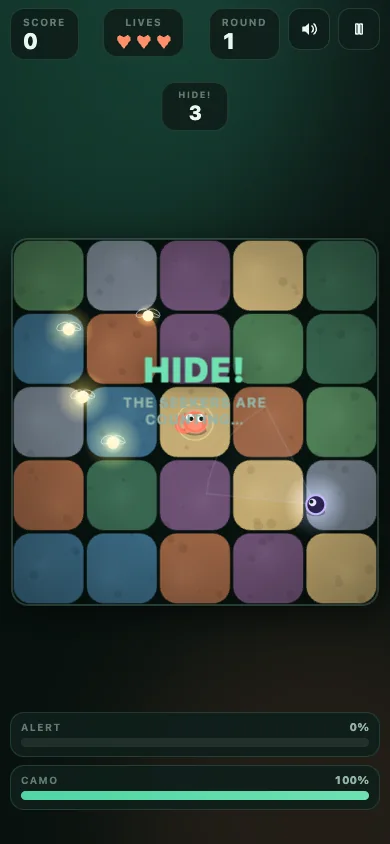
Pause is currently one-way
Pausing freezes the round, including the seek timer and every Seeker. The problem is getting out: in the build we tested, RESUME does not respond, and pressing Esc or P again re-pauses instead of resuming. We confirmed this on the original 8x.gg page as well, so it is a game bug rather than an embedding problem.
The game also pauses itself when you switch tabs or apps. Since it cannot always resume, avoid switching away in the middle of a round.
If you are already stuck on the PAUSED panel, use Reload in the bar above the game. QUIT on the panel also returns you to the menu, but either way the current run ends.
Common problems with the Mottle Game controls
What usually causes each symptom, and the shortest fix.
| Symptom | Likely cause | Fix |
|---|---|---|
| WASD does nothing | The game frame does not have keyboard focus | Click once inside the arena, then try again |
| Creature goes the wrong way | You pressed far from it, setting a distant destination | Release, then press closer to the creature |
| Page scrolls while dragging | The press started outside the arena | Start the drag inside the game area |
| Movement continues after release | The pointer was captured by the browser mid-drag | Use Reload above; the current build cannot reliably resume |
| Game pauses on its own | Tab or app switched away | Use Reload above; the current build cannot resume |
| No fullscreen button | The browser does not support element fullscreen | Use the browser's own fullscreen, or play in the window |
Questions
Mottle Game controls FAQ
Can I play Mottle with only a keyboard?
Yes. WASD or the arrow keys move, and Esc or P pauses. You still need a pointer, or the game's own Play button, to start a round from the menu. Note that Resume does not currently work, so avoid pausing.
Can I change or remap the Mottle Game controls?
No. The Mottle Game controls are a fixed set of inputs, and there is no settings menu for remapping. Browser-level key remapping is outside our control and outside the game's.
Does Mottle support a gamepad?
We did not find gamepad handling in the build we tested, and we have no verified report of it working. Treat gamepad support as unavailable until the creator says otherwise.
Why does the Resume button do nothing?
Because of a bug in the current game build. Pausing works, but the resume action is unreachable in the game’s own logic, so RESUME and a second Esc or P both re-pause. We reproduced it on the original 8x.gg page, outside our embed. Use Reload above to start again.
Why does the game pause when I switch tabs?
It is built in. Losing focus pauses the round so you do not lose a life while reading something else — but the current build cannot resume afterwards, so the round is effectively over. Use Reload above.
Next